First Month Free — use code BTS40. Offer valid for 80 credits plan.Learn More
This class is no longer available, but we found something similar!
200
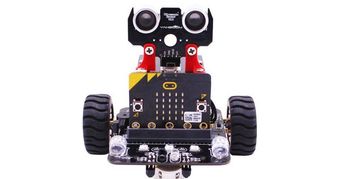
STEM: Robotics Using Microbit - Intermediate Level Hands On!
Completed by 251 learners
Ages 10-15
Live Group Class

Average rating:
4.9
Number of reviews:(3,395 reviews)
Popular
Live video meetings
1x per week, 5 weeks
3-18 learners per class
50 min
What’s included

5 live meetings
4 hrs 10 mins in-class hoursHomework
2-4 hours per week. Between classes it is expected to work on the class challenge and bring it operating to class the next week. Help will be available during the week as required.Assessment
Each challenge is presented as a class competition where robots compete with each other for accuracy, efficiency and successful mission completion.Class Experience
If you already have the basic skills of robotics, this class takes your skills to the next level, in a fun and somewhat competitive sense. Each class presents a project challenge with guidance but the students are expected to write their own code from brief examples. This fosters a greater sense of accomplishment than just copying code and running it. Students then work on their project during the week with constant communication with each other and the teacher, then demonstrate their accomplishments in the next class.

The robot used in this class is the Yahboom robot with the Microbit microcontroller. This robot is the one built in the "Introduction to Robotics" class offered by me on outschool. Beginners are recommended to take that class first. More experienced students can acquire and build the robot on their own to prepare for class  links to materials are provided below.

The flow of each project will be:
  1. New project is introduced and explained
  2. Discussion about potential programming approaches, with code samples
  3. Work on the project during class and during the week
  4. Present the project to the class
  5. Review and explore the coding methods used in the project


Weekly Schedule:

Week 1:   The Racetrack
   Each participant will program their robot to race around the oval track, doing 10 laps in the shortest time possible without flying off the track.

Week 2: Review racetrack project, results and code used, explore suggestions for improvement

Week 3: Explain programming of the neopixel "rainbow" light

Week 4.  "Follow something" project
   Each participant will program the robot to find and follow an object at a certain distance

Week 5. Review the "follow" project, results, and code used, explore suggestions for improvement
Learning Goals
This class focuses on more advanced concepts of robotics after the beginner class. Concepts will include coding efficiency, sensor limitations, and accomplishing a real world task.Other Details
Supply List
Each student is expected to bring to class the robot and microcontroller. This can either be built in the "introduction to robotics" class or acquired on your own from these links.

https://perfectpackageonline.com/index.php/product/complete-robot-kit/

Also, you will need the paper "race track" that is in the robot package.  a white paper with a big black oval.
External Resources
In addition to the Outschool classroom, this class uses:
Meet the teacher
Teacher expertise and credentials
I have been involved in computer science and robotics for 5 decades, having hand built my first robot as a teenager back in the day where parts had to be manually hard wired from scratch. In my career I have touched on many hardware / software disciplines and have several patents to my name in this field. This gives me a unique view on hardware and software as two parts of a whole end product.
In addition to the technical skills I have spent decades explaining difficult computer science concepts to non-technical crowds including investors, administrators, salesmen, etc.  This provided a solid basis for teaching these skills in an age appropriate manner.
My computer science classes bring these two (technical abilities and teaching experience) together into a fun, exciting hands on experience that is age appropriate.
I have worked with this particular Yahboom robot for about 4 years now, and successfully taught basic robotics and some fairly advanced concepts) with this robot to hundreds of students. Reviews
Related categories
Are you planning to use state funding, such as an Education Savings Account (ESA), Micro-grant or scholarship to help pay for your learner’s education?
Financial Assistance
Homeschool Resources
Tutoring
More to Explore
Classes by Age
Classes by Grade
Get The App